Your First Week With a Tesla: What to Do (and Not Do)
The first week with a Tesla sets habits you'll keep for years — how you charge, how you drive, and which features you actually use. Tesla ownership has a real learning curve, but almost all of it clicks within seven days. Here's a day-by-day plan that keeps you from making the rookie mistakes.
Day 1 — the drive home
- Ease into the acceleration. Even a non-Performance Model 3 or Y hits 60 mph in well under five seconds. If that feels jarring, switch to Controls > Pedals & Steering > Acceleration > Chill for the first day.
- Set your charge limit to 80% as soon as you get home (tap the charging icon on the screen). That's your everyday ceiling on a nickel-based pack — see the battery note below for the LFP exception.
- Watch the energy app. Swipe up on the nav card to see consumption in Wh/mile and learn how speed, climate, and hills move the number in real time.
Days 1–3 — get used to one-pedal driving
Tesla uses strong regenerative braking by default: lift off the accelerator and the car slows firmly while recovering energy. Don't change the setting yet — nearly every owner who softens regen early regrets it later. Give it a week and it becomes second nature. The trick is to look further ahead than you would in a gas car and modulate with how gradually you lift off.
Set your stopping behavior at Controls > Pedals & Steering > Stopping Mode: Hold (recommended — the car holds itself on hills and in traffic), Creep (mimics a gas-car idle), or Roll (coasts; not recommended for new owners).
Days 2–4 — set up home charging
- For the first night, a standard 120V outlet with the included adapter adds only 3–4 miles/hour — fine as a stopgap.
- Book an electrician this week for a NEMA 14-50 outlet or a Wall Connector (our installation-cost guide walks through the options and what they should cost).
- Use Scheduled Departure (Controls > Charging) rather than a fixed start time — it preconditions the battery and cabin on grid power so you leave full and warm. Critical in winter, good practice year-round.
Days 3–7 — learn Autopilot the safe way
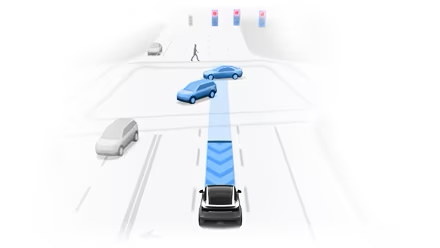
Every Tesla ships with basic Autopilot: traffic-aware cruise control plus lane centering. This is driver assistance, not self-driving. Try it first on a well-marked highway with no merges or construction, keep your hands on the wheel (the car checks for steering input), and don't lean on it in rain, at night, or in work zones during your first week. If you have Full Self-Driving (Supervised), it adds lane changes, ramp navigation, and city-street driving — but you must stay ready to take over at all times. New owners get a 30-day FSD trial to explore it.
Your first-week checklist
- Set the daily charge limit to 80% (or leave at 100% for LFP).
- Connect the car to home Wi-Fi so updates install overnight.
- Set software updates to Advanced (Controls > Software).
- Create your driver profile so seat, mirror, and climate preferences load automatically.
- Install the Tesla app and turn on notifications (Sentry, charge complete, updates).
- Learn the voice-command button (press the right scroll wheel).
- Run Autopilot once on a calm stretch of highway.
Battery note — 80% vs 100%
U.S. Model 3 and Model Y for 2025–2026 use nickel-based (NMC/NCA) batteries — keep the daily limit at 80% and only go to 100% right before a long trip, then drive it down rather than letting it sit. Some non-U.S. Standard Range cars use LFP batteries, which should be charged to 100% regularly for calibration; confirm yours under Controls > Software. Once you're settled in, our essential settings guide and new-owner FAQ cover everything else.